
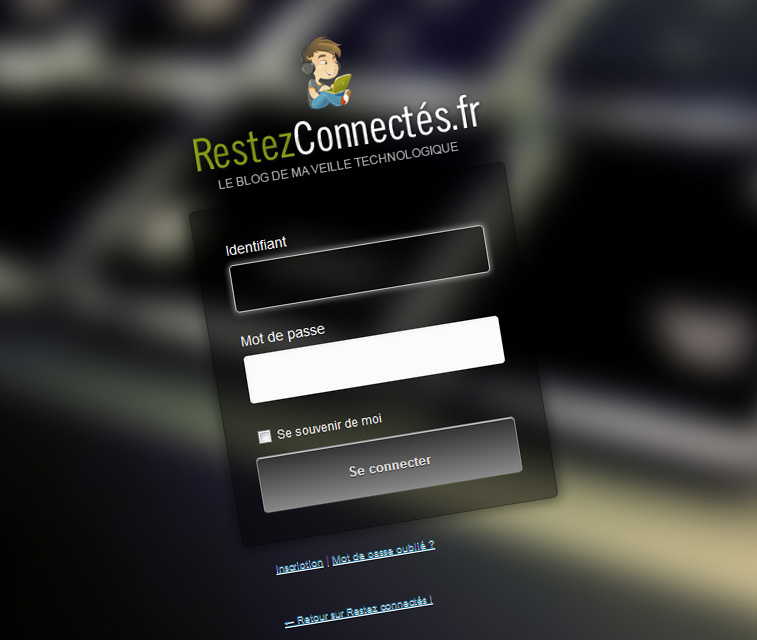
Depuis des années, nous avons utilisé WordPress mais l’écran de connexion n’a pas beaucoup changé, vous êtes d’accord avec moi ?
Pourquoi ne pas le changer pour une page de connexion totalement personnalisée ? Les possibilités sont infinies. Avec un peu de CSS et de Javascript, vous pouvez avoir une page de connexion vous ressemble et surtout adapté à votre thème.
Dans ce tutoriel, nous allons voir quelles sont les étapes pour créer une page de connexion WordPress :
- avec un arrière-plan personnalisé,
- des polices et des styles personnalisés,
- ainsi que d’une fantaisie jQuery effet de fondu sur le formulaire.
Joli programme !
Avant de commencer, il est très important de créer un dossier /login/ dans le répertoire de votre thème. Nous allons y créer plusieurs fichiers et aussi stocker nos images.
Premier fichier à créer : login-styles.css
Ce fichier doit être appelé dans le fichier functions.php de votre thème. Pour ma part, j’ai préféré créer un fichier login-functions.php qui va intégrer tous les scripts dont on aura besoin.
Il faut appeler le fichier login-functions.php dans votre fichier functions.php de votre thème.
[pastacode manual= »%3C%3Fphp%0D%0A%2F*%20Include%20du%20fichier%20pour%20la%20page%20login%20personalis%C3%A9e%20*%2F%0D%0Ainclude_once%20%22login%2Flogin-functions.php%22%3B%0D%0A%3F%3E » provider= »manual » lang= »php »/]
Étape 1. Les scripts
L’appel de la feuille de style
Étape 1. Les scripts
L’appel de la feuille de style
[pastacode manual= »function%20custom_login_css()%20%7B%0D%0Aecho%20’%3Clink%20rel%3D%22stylesheet%22%20type%3D%22text%2Fcss%22%20href%3D%22′.get_stylesheet_directory_uri().’%2Flogin%2Flogin-styles.css%22%20%2F%3E’%3B%0D%0A%7D%0D%0A%0D%0Aadd_action(‘login_head’%2C%20’custom_login_css’)%3B » provider= »manual » lang= »php »/]
Les fonts Google
[pastacode manual= »function%20custom_fonts()%20%7B%0D%0A%20%20%20%20echo%20’%3Clink%20href%3D%22http%3A%2F%2Ffonts.googleapis.com%2Fcss%3Ffamily%3DOpen%2BSans%2BCondensed%3A300%2C700%22%20rel%3D%22stylesheet%22%20type%3D%22text%2Fcss%22%20%2F%3E’%3B%0D%0A%7D%0D%0Aadd_action(‘login_head’%2C%20’custom_fonts’)%3B » provider= »manual » lang= »php »/]
L’effet fade-in pour le formulaire
[pastacode manual= »add_action(%20’login_head’%2C%20’untame_fadein’%2C30)%3B%0D%0A%0D%0Afunction%20untame_fadein()%20%7B%0D%0A%20%20%20%20echo%20’%0D%0A%20%20%20%20%3Cscript%20type%3D%22text%2Fjavascript%22%20src%3D%22%2F%2Fajax.googleapis.com%2Fajax%2Flibs%2Fjquery%2F1.7.2%2Fjquery.js%22%3E%3C%2Fscript%3E%0D%0A%20%20%20%20%3Cscript%20type%3D%22text%2Fjavascript%22%3E%2F%2F%20%3C!%5BCDATA%5B%0D%0A%20%20%20%20jQuery(document).ready(function()%20%7B%20jQuery(%22%23loginform%2C%23nav%2C%23backtoblog%22).css(%22display%22%2C%20%22none%22)%3B%20%20%20%20%20%20%20%20%20%20jQuery(%22%23loginform%2C%23nav%2C%23backtoblog%22).fadeIn(3500)%3B%20%20%20%20%20%0D%0A%20%20%20%20%7D)%3B%0D%0A%20%20%20%20%2F%2F%20%5D%5D%3E%3C%2Fscript%3E’%3B%0D%0A%7D » provider= »manual » lang= »php »/]
L’URL personnalisée pour le logo
[pastacode manual= »add_filter(%20’login_headerurl’%2C%20’custom_login_header_url’%20)%3B%0D%0Afunction%20custom_login_header_url(%24url)%20%7B%0D%0A%20%20%20%20return%20’URL_DE_MON_SITE’%3B%0D%0A%7D » provider= »manual » lang= »php »/]
Etape 2 : La feuille de style
Les fonts Google
[pastacode manual= »function%20custom_fonts()%20%7B%0D%0A%20%20%20%20echo%20’%3Clink%20href%3D%22http%3A%2F%2Ffonts.googleapis.com%2Fcss%3Ffamily%3DOpen%2BSans%2BCondensed%3A300%2C700%22%20rel%3D%22stylesheet%22%20type%3D%22text%2Fcss%22%20%2F%3E’%3B%0D%0A%7D%0D%0Aadd_action(‘login_head’%2C%20’custom_fonts’)%3B » provider= »manual » lang= »php »/]
L’effet fade-in pour le formulaire
[pastacode manual= »add_action(%20’login_head’%2C%20’untame_fadein’%2C30)%3B%0D%0A%0D%0Afunction%20untame_fadein()%20%7B%0D%0A%20%20%20%20echo%20’%0D%0A%20%20%20%20%3Cscript%20type%3D%22text%2Fjavascript%22%20src%3D%22%2F%2Fajax.googleapis.com%2Fajax%2Flibs%2Fjquery%2F1.7.2%2Fjquery.js%22%3E%3C%2Fscript%3E%0D%0A%20%20%20%20%3Cscript%20type%3D%22text%2Fjavascript%22%3E%2F%2F%20%3C!%5BCDATA%5B%0D%0A%20%20%20%20jQuery(document).ready(function()%20%7B%20jQuery(%22%23loginform%2C%23nav%2C%23backtoblog%22).css(%22display%22%2C%20%22none%22)%3B%20%20%20%20%20%20%20%20%20%20jQuery(%22%23loginform%2C%23nav%2C%23backtoblog%22).fadeIn(3500)%3B%20%20%20%20%20%0D%0A%20%20%20%20%7D)%3B%0D%0A%20%20%20%20%2F%2F%20%5D%5D%3E%3C%2Fscript%3E’%3B%0D%0A%7D » provider= »manual » lang= »php »/]
L’URL personnalisée pour le logo
[pastacode manual= »add_filter(%20’login_headerurl’%2C%20’custom_login_header_url’%20)%3B%0D%0Afunction%20custom_login_header_url(%24url)%20%7B%0D%0A%20%20%20%20return%20’URL_DE_MON_SITE’%3B%0D%0A%7D » provider= »manual » lang= »php »/]
Etape 2 : La feuille de style
Pour l’image d’arrière plan, la chose la plus importante à retenir est que vous aurez besoin de la prendre assez grande pour un meilleur rendu sur tous les écrans.
[pastacode manual= »body.login%20%7Bbackground%3A%20%23fbfbfb%20url(‘bg.jpg’)%20no-repeat%20fixed%20center%3B%20%7D%0D%0A%0D%0A.login%20h1%20a%20%7B%0D%0A%20%20%20%20background-image%3A%20url(‘..%2Flogin%2Flogo.png’)%3B%0D%0A%20%20%20%20background-size%3A%20299px%20172px%3B%0D%0A%20%20%20%20width%3A%20320px%3B%0D%0A%20%20%20%20height%3A%20160px%3B%0D%0A%7D%0D%0A%0D%0A%23login%20%7B%0D%0A%20%20%20%20padding%3A%2070px%200%200%3B%0D%0A%7D%0D%0A%0D%0A.login%20form%20%7B%0D%0A%20%20%20%20margin-left%3A%20auto%3B%0D%0A%20%20%20%20margin-right%3A%20auto%3B%0D%0A%20%20%20%20padding%3A%2030px%3B%0D%0A%20%20%20%20border%3A%201px%20solid%20rgba(0%2C0%2C0%2C.2)%3B%0D%0A%20%20%20%20-moz-border-radius%3A%205px%3B%0D%0A%20%20%20%20-webkit-border-radius%3A%205px%3B%0D%0A%20%20%20%20border-radius%3A%205px%3B%0D%0A%20%20%20%20-moz-background-clip%3A%20padding%3B%0D%0A%20%20%20%20-webkit-background-clip%3A%20padding-box%3B%0D%0A%20%20%20%20background-clip%3A%20padding-box%3B%0D%0A%20%20%20%20background%3A%20rgba(0%2C%200%2C%200%2C%200.5)%3B%0D%0A%20%20%20%20-moz-box-shadow%3A%200%200%2013px%203px%20rgba(0%2C0%2C0%2C.5)%3B%0D%0A%20%20%20%20-webkit-box-shadow%3A%200%200%2013px%203px%20rgba(0%2C0%2C0%2C.5)%3B%0D%0A%20%20%20%20box-shadow%3A%200%200%2013px%203px%20rgba(0%2C0%2C0%2C.5)%3B%0D%0A%20%20%20%20overflow%3A%20hidden%3B%0D%0A%7D%0D%0A.login%20form%20input%20%7B%0D%0A%20%20%20%20width%3A%20240px%3B%0D%0A%20%20%20%20height%3A%2048px%3B%0D%0A%20%20%20%20-moz-border-radius%3A%204px%3B%0D%0A%20%20%20%20-webkit-border-radius%3A%204px%3B%0D%0A%20%20%20%20border-radius%3A%204px%3B%0D%0A%20%20%20%20display%3A%20block%3B%0D%0A%7D%0D%0A%0D%0A.login%20form%20input%3Afocus%2C%0D%0A.login%20form%20textarea%3Afocus%20%7B%0D%0A%20%20%20%20background-color%3A%20rgba(0%2C%200%2C%200%2C%200.2)%3B%0D%0A%20%20%20%20-moz-box-shadow%3A%200%200%205px%201px%20rgba(255%2C255%2C255%2C.5)%3B%0D%0A%20%20%20%20-webkit-box-shadow%3A%200%200%205px%201px%20rgba(255%2C255%2C255%2C.5)%3B%0D%0A%20%20%20%20box-shadow%3A%200%200%205px%201px%20rgba(255%2C255%2C255%2C.5)%3B%0D%0A%20%20%20%20overflow%3A%20hidden%3B%0D%0A%7D%0D%0A.login%20label%20%7B%0D%0A%20%20%20%20color%3A%20%23fff%3B%0D%0A%20%20%20%20line-height%3A%2026px%3B%0D%0A%7D%0D%0A%0D%0A.login%20form%20.input%2C%0D%0A.login%20input%5Btype%3D%22text%22%5D%20%7B%20color%3A%20%238c8a8a%3B%7D%0D%0Ainput%23rememberme%20%7B%0D%0A%20%20%20%20height%3A%2018px%3B%0D%0A%20%20%20%20width%3A%2018px%3B%0D%0A%20%20%20%20display%3A%20inline%3B%0D%0A%20%20%20%20vertical-align%3A%20middle%3B%0D%0A%20%20%20%20margin%3A%2010px%200%3B%0D%0A%7D%0D%0Ainput.button-primary%20%7B%0D%0A%20%20%20%20width%3A%20138px%3B%0D%0A%20%20%20%20height%3A%2044px%3B%0D%0A%20%20%20%20-moz-border-radius%3A%204px%3B%0D%0A%20%20%20%20-webkit-border-radius%3A%204px%3B%0D%0A%20%20%20%20border-radius%3A%204px%3B%0D%0A%20%20%20%20float%3Aright%3B%0D%0A%20%20%20%20border%3A%201px%20solid%20%23888888%3B%0D%0A%20%20%20%20background%3A%20%23888888%3B%0D%0A%20%20%20%20background%3A%20-webkit-gradient(linear%2C%20left%20top%2C%20left%20bottom%2C%20from(%23333333)%2C%20to(%23888888))%3B%0D%0A%20%20%20%20background%3A%20-webkit-linear-gradient(top%2C%20%23333333%2C%20%23888888)%3B%0D%0A%20%20%20%20background%3A%20-moz-linear-gradient(top%2C%20%23333333%2C%20%23888888)%3B%0D%0A%20%20%20%20background%3A%20-ms-linear-gradient(top%2C%20%23333333%2C%20%23888888)%3B%0D%0A%20%20%20%20background%3A%20-o-linear-gradient(top%2C%20%23333333%2C%20%23888888)%3B%0D%0A%20%20%20%20background-image%3A%20-ms-linear-gradient(top%2C%20%23333333%200%25%2C%20%23888888%20100%25)%3B%0D%0A%20%20%20%20padding%3A%2010.5px%2021px%3B%0D%0A%20%20%20%20-webkit-border-radius%3A%206px%3B%0D%0A%20%20%20%20-moz-border-radius%3A%206px%3B%0D%0A%20%20%20%20border-radius%3A%206px%3B%0D%0A%20%20%20%20-webkit-box-shadow%3A%20rgba(255%2C255%2C255%2C0.1)%200%201px%200%2C%20inset%20rgba(255%2C255%2C255%2C0.7)%200%201px%200%3B%0D%0A%20%20%20%20-moz-box-shadow%3A%20rgba(255%2C255%2C255%2C0.1)%200%201px%200%2C%20inset%20rgba(255%2C255%2C255%2C0.7)%200%201px%200%3B%0D%0A%20%20%20%20box-shadow%3A%20rgba(255%2C255%2C255%2C0.1)%200%201px%200%2C%20inset%20rgba(255%2C255%2C255%2C0.7)%200%201px%200%3B%0D%0A%20%20%20%20text-shadow%3A%20%23333333%200%201px%200%3B%0D%0A%20%20%20%20color%3A%20%23e1e1e1%3B%0D%0A%7D%0D%0A%0D%0Ainput.button-primary%3Ahover%20%7B%0D%0A%20%20%20%20border%3A%201px%20solid%20%23888888%3B%0D%0A%20%20%20%20text-shadow%3A%20%23333333%200%201px%200%3B%0D%0A%20%20%20%20background%3A%20%23888888%3B%0D%0A%20%20%20%20background%3A%20-webkit-gradient(linear%2C%20left%20top%2C%20left%20bottom%2C%20from(%23888888)%2C%20to(%23888888))%3B%0D%0A%20%20%20%20background%3A%20-webkit-linear-gradient(top%2C%20%23888888%2C%20%23888888)%3B%0D%0A%20%20%20%20background%3A%20-moz-linear-gradient(top%2C%20%23888888%2C%20%23888888)%3B%0D%0A%20%20%20%20background%3A%20-ms-linear-gradient(top%2C%20%23888888%2C%20%23888888)%3B%0D%0A%20%20%20%20background%3A%20-o-linear-gradient(top%2C%20%23888888%2C%20%23888888)%3B%0D%0A%20%20%20%20background-image%3A%20-ms-linear-gradient(top%2C%20%23888888%200%25%2C%20%23888888%20100%25)%3B%0D%0A%20%20%20%20color%3A%20%23fff%3B%0D%0A%7D%0D%0A%0D%0Ainput.button-primary%3Aactive%20%7B%0D%0A%20%20%20%20margin-top%3A1px%3B%0D%0A%20%20%20%20text-shadow%3A%20%23333333%200%20-1px%200%3B%0D%0A%20%20%20%20border%3A%201px%20solid%20%23333333%3B%0D%0A%20%20%20%20background%3A%20%23333333%3B%0D%0A%20%20%20%20background%3A%20-webkit-gradient(linear%2C%20left%20top%2C%20left%20bottom%2C%20from(%23333333)%2C%20to(%23888888))%3B%0D%0A%20%20%20%20background%3A%20-webkit-linear-gradient(top%2C%20%23333333%2C%20%23888888)%3B%0D%0A%20%20%20%20background%3A%20-moz-linear-gradient(top%2C%20%23333333%2C%20%23888888)%3B%0D%0A%20%20%20%20background%3A%20-ms-linear-gradient(top%2C%20%23333333%2C%20%23888888)%3B%0D%0A%20%20%20%20background%3A%20-o-linear-gradient(top%2C%20%23333333%2C%20%23888888)%3B%0D%0A%20%20%20%20background-image%3A%20-ms-linear-gradient(top%2C%20%23416b68%200%25%2C%20%23888888%20100%25)%3B%0D%0A%20%20%20%20color%3A%20%23fff%3B%0D%0A%20%20%20%20-webkit-box-shadow%3A%20rgba(255%2C255%2C255%2C0)%200%201px%200%2C%20inset%20rgba(255%2C255%2C255%2C0.7)%200%201px%200%3B%0D%0A%20%20%20%20-moz-box-shadow%3A%20rgba(255%2C255%2C255%2C0)%200%201px%200%2C%20inset%20rgba(255%2C255%2C255%2C0.7)%200%201px%200%3B%0D%0A%20%20%20%20box-shadow%3A%20rgba(255%2C255%2C255%2C0)%200%201px%200%2C%20inset%20rgba(255%2C255%2C255%2C0.7)%200%201px%200%3B%0D%0A%7D%0D%0A%0D%0A.login%20%23nav%2C%20.login%20%23backtoblog%20%7B%0D%0A%20%20%20%20float%3A%20left%3B%0D%0A%20%20%20%20margin%3A%200%200%200%2013px%3B%0D%0A%20%20%20%20padding-bottom%3A%2020px%3B%0D%0A%7D%0D%0A.login%20%23nav%20a%2C%20.login%20%23backtoblog%20a%20%7B%0D%0A%20%20%20%20font-family%3A%20’Sans%20ouvertes%20Condens%C3%A9’%2Csans-serif%3B%0D%0A%20%20%20%20font-size%3A%2010px%3B%0D%0A%20%20%20%20color%3A%23ffffff%3B%0D%0A%7D%0D%0Adiv.updated%2C%20.login%20.message%20%7B%0D%0A%20%20%20%20background-color%3A%20lightYellow%3B%0D%0A%20%20%20%20border-color%3A%20%23E6DB55%3B%0D%0A%20%20%20%20font-family%3A%20’Sans%20ouvertes%20Condens%C3%A9’%2Csans-serif%3B%0D%0A%20%20%20%20font-size%3A%2016px%3B%0D%0A%20%20%20%20font-weight%3A%20700%3B%0D%0A%7D%0D%0A%0D%0Adiv.updated%2C%0D%0A.login%20.message%20%7B%0D%0A%20%20%20%20background-color%3A%20lightYellow%3B%0D%0A%20%20%20%20border-color%3A%20%23E6DB55%3B%0D%0A%20%20%20%20font-family%3A%20’Sans%20ouvertes%20Condens%C3%A9’%2C%20sans-serif%3B%0D%0A%20%20%20%20font-size%3A%2016px%3B%0D%0A%20%20%20%20font-weight%3A%20700%3B%0D%0A%7D » provider= »manual » lang= »css »/]
A vous maintenant de travailler sur votre page de login !
Démo : https://restezconnectes.fr/wp-login.php
A vous maintenant de travailler sur votre page de login !
Démo : https://restezconnectes.fr/wp-login.php

Intéréssant ! Merci ce petit tutoriel. Vraiment pratique.
Bonjour, je n’arrive pas a l’utilisé